 Club management · Play-Cricket sync
Team selection
Pick the side once. Everyone knows.
Captains pick from who’s actually available, build the XI in draft, then publish: every selected player is notified and confirms in one tap. Change it later and only the players affected hear about it.
Start free, select on Club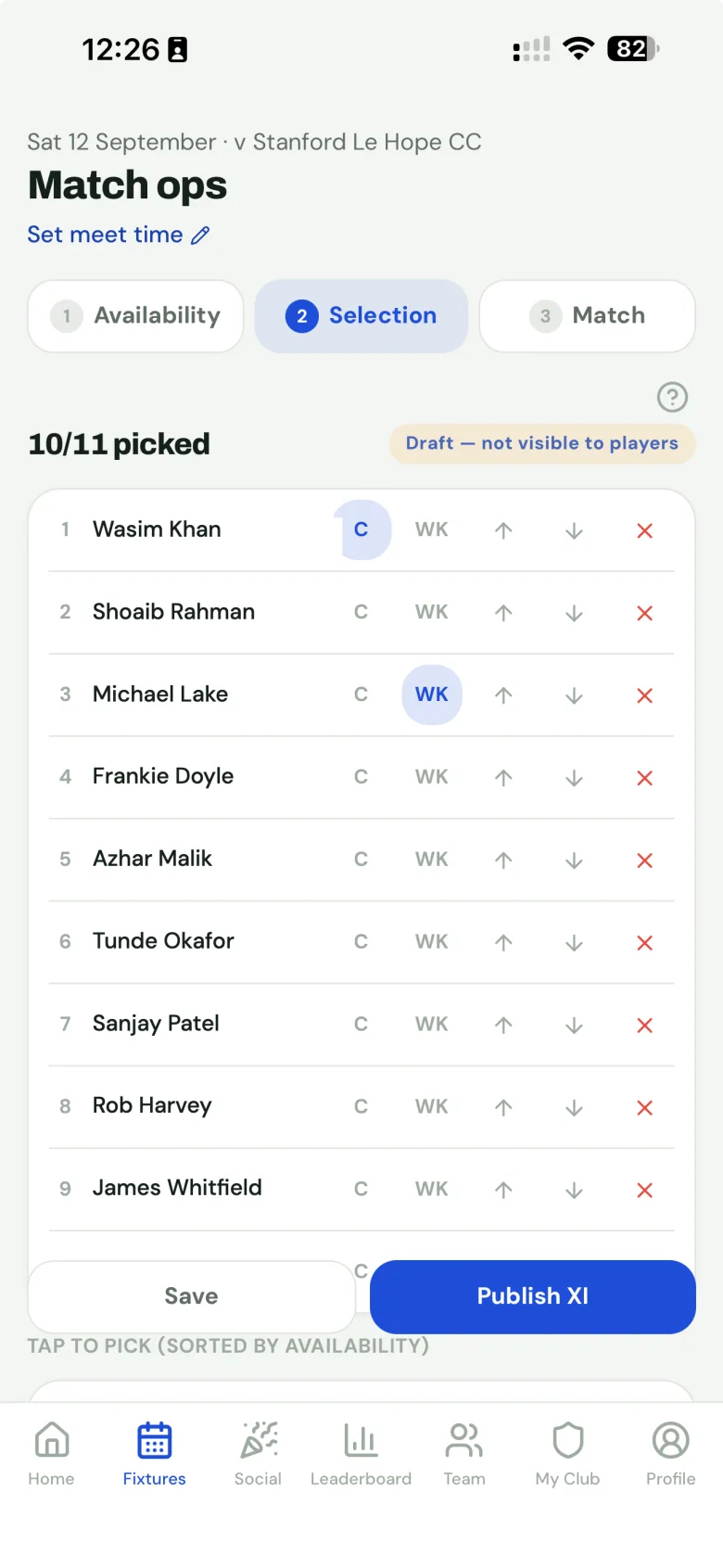
From availability to a published XI
- Pick from who’s free. Players have already answered availability for the date, so the selection screen shows who’s in, who’s a maybe and who hasn’t replied, for every team playing that day.
- Build it in draft. Order the side and mark your captain (c) and keeper (wk). Nothing is visible to players and nothing is sent while you work.
- Publish. The team sheet goes live with the XI, start and meet times and the ground, and every selected player gets a push notification and an email.
- Players confirm. One tap from the email, no login. You see who has confirmed and can chase only the stragglers.
Changes without the spam
Someone drops out on Friday night. You swap in a replacement and republish, and by default only the players affected are told: the new pick, and anyone whose place changed. Everyone else stays quiet, and players who already confirmed keep their tick through minor changes. If it’s a big rethink, re-notify the whole XI instead; the confirm step tells you exactly who is about to be messaged.
Need to stop and rethink completely? Pull the side back to draft and it disappears for players until you publish again.
Match day, from the team sheet
- A shareable team sheet: a branded image in your club’s colours, ready to post in the WhatsApp group.
- Match chat for the selected XI and committee: lift shares, kit, “pitch is damp, bring spikes”. It locks a week after the game.
- Match fees requested against the published side, paid by Apple Pay or Google Pay, with cash marked on the spot. How match fees work.
Why selection needs its own tool
Most clubs pick sides in a WhatsApp group and a captain’s notes app. It works until two teams play on the same day, someone pulls out, and nobody is sure which version of the side is the real one. A selection app gives every team one published sheet, a record of who has confirmed, and notifications that go only to the people they’re about. Play-Cricket’s own team picker records the side for the league; MVP Cricket runs the week before it.
Questions
Can players see the side while I’m still picking it?
No. Selection happens in draft: nothing is visible to players and no notifications go out until you publish. Reshuffle as much as you like.
How do players find out they’re picked?
Publishing notifies every selected player by push notification, if they’ve installed the app, and by email regardless. The email has a one-tap confirm button that works without logging in.
What happens if I change the side after publishing?
By default only the players affected are told: new picks and anyone whose place changed. If it’s a big rethink you can re-notify the whole XI instead, and the confirm step shows exactly who is about to be messaged.
Can I share the team sheet in our WhatsApp group?
Yes. Every published side has a branded team-sheet image in your club’s colours that you can share straight to WhatsApp from your phone.
We run several teams on the same Saturday. Does that work?
Yes. Players answer availability once per date, so every captain picks from the same picture, and a captain can set a player’s status for one specific match (released for the 1s, say) without touching their other games.
Which plan includes selection?
Availability, selection and published team sheets are part of the Club plan: £9.99 a month or £99 a year, for up to six teams. Every club starts on Free.
Selection and team sheets are part of Club: £99 a year, up to six teams. Every club starts free.